RV LIFE - RV GPS & Campgrounds
- 3.9
- Rating
- 1.00M
- Installs
- Free
- Price

 Analysis by App-foxy
Planning an RV trip is different from planning an ordinary car journey. A route that looks perfectly reasonable on a regular map may be unsuitable for a large motorhome, while a campground that appears close to the destination may not fit your rig or match the kind of stop you want. After spending time with RV LIFE - RV GPS & Campgrounds, I found its main value in bringing those two parts of the journey together: finding places to stay and navigating between them in one travel-focused app.
My overall view is positive, with an important qualification. This is most useful when your trips revolve around campgrounds, RV parks, and the practical decisions that come with driving a recreational vehicle. It is less compelling if you only need ordinary turn-by-turn directions or if you prefer building every part of a trip manually in separate apps. For the right traveler, the combination is convenient enough to become a regular planning tool rather than something opened only when a route goes wrong.
What makes the app useful on an actual RV trip
The app comes from Social Knowledge, LLC, and sits in the Travel & Local category. It is free to install, carries an Everyone age rating, and has grown to over a million installs. Those figures fit my impression of the product: it is aimed at ordinary travelers, not at a narrow professional audience, and the interface is approachable even when the trip itself is complicated.
You May Also Like

 Blood Strike: 2.5 Anniversary
Blood Strike’s Loadouts Turn Every Drop Into a Tactical Gamble
A close look at Blood Strike’s custom loadouts: how fast access to signature weapons reshapes its battle royale rhythm, rewards preparation, and narrows the gap between fights.

 Pandora - Music & Podcasts
Pandora’s Music Is Easy to Start, but Harder to Recover
Pandora’s strength is its low-effort path from a seed to a station. Its weak spot is how much confidence it asks you to place in connection, setup, and quiet recovery.

 8 Ball Pool
 Is Built on Rivalries, Rematches, and Routine
A close look at the rivalries, rematches, shared routines, and unanswered safety questions that turn a quick pool match into a persistent mobile community.

 Samsung Music
’s Quiet Strength Is Playing What You Already Own
Its reach comes less from spectacle than from dependable access to a personal library. That simplicity is both the app’s strongest retention engine and its ceiling.

 AccuWeather: Weather Radar
AccuWeather Review: A Quick, Clear Forecast for Everyday Decisions
For everyday plans, the best forecast is the one you can understand quickly. AccuWeather makes rain timing, radar, and local conditions easy to act on, with a few trade-offs.

 Hill Climb Racing
Why Hill Climb Racing Still Turns Crashes Into One More Run
A tiny car, a bumpy hill and one more upgrade: Hill Climb Racing keeps resurfacing because its simple chaos makes every near-miss feel personal.
More From Our News Desk



The first thing I noticed is that the campground search is not treated as an afterthought. In a conventional map app, accommodation is often just another place marker. Here, the decision about where to sleep is much closer to the center of the experience. That matters because an RV itinerary is usually built around stopping points. I may know the general direction I want to travel, but the practical route depends on where I can camp comfortably, how far I want to drive, and whether the next stop makes sense for the vehicle.
That makes the app especially helpful during the early planning stage. Instead of choosing a destination first and then scrambling to find a suitable campground nearby, I can think in reverse: identify realistic overnight areas, compare them with the route, and shape the day around those stops. This is a small change in workflow, but it prevents a common mistake—creating an attractive itinerary that becomes stressful once driving time and campground availability enter the picture.
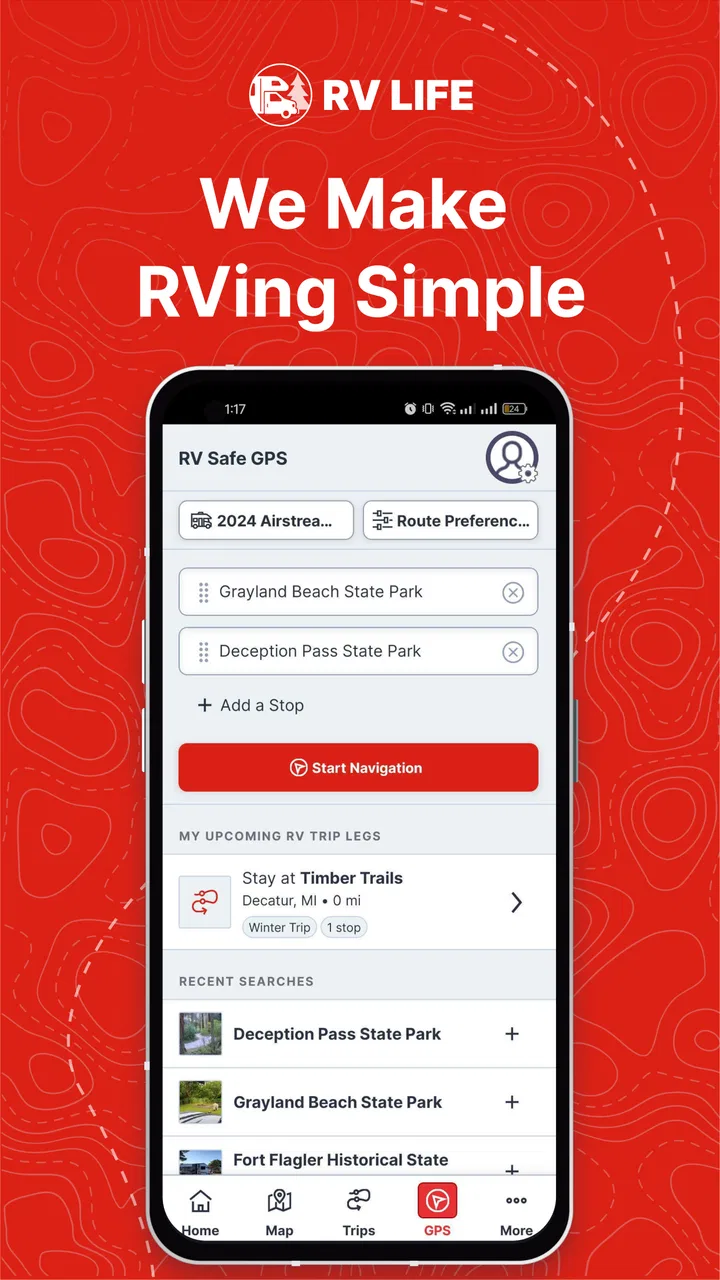
The navigation side also gives the app a clear purpose beyond a campground directory. A list of parks can help me decide where to stay, but it does not solve the problem of getting there. Having the route and campground search in the same travel tool reduces the amount of switching between applications. I still treat any navigation app as an aid rather than an authority, but the single-purpose focus makes the journey easier to organize.
Why the campground-first approach matters
For a realistic example, imagine leaving home on a Friday afternoon with a motorhome and hoping to reach a park before dark. A normal map application may suggest the fastest road to a town, but it does not naturally encourage me to think about the final approach, the overnight stop, or whether I am choosing a sensible distance for the day. With this app, I can begin by looking for campgrounds along the general corridor, narrow the options according to the trip I have in mind, and then use the selected stop as the anchor for navigation.
That workflow is more useful than simply searching “campgrounds near me” after I am already tired. It encourages decisions before departure, when I have time to consider the route and avoid turning the last part of the day into a rushed search. I also like that it supports a more flexible style of travel: I can plan a firm overnight stop when timing matters, or use the campground search to discover alternatives if the original plan no longer feels comfortable.
A less obvious benefit is that the app can change how I judge distance. In a car, an extra stretch of road may be a minor inconvenience. In an RV, the same stretch can affect fuel planning, arrival time, rest breaks, and the overall enjoyment of the day. By putting campgrounds and navigation in the same context, the app nudges me toward thinking in terms of manageable travel days rather than simply the shortest route.
That does not mean it removes the need for judgment. I would still check the campground’s current details before committing, especially for a larger rig, a late arrival, or a busy travel period. The app helps me discover and organize options; it should not replace a final confirmation with the campground itself when the booking or access details are important.
Useful habits that improve the experience
My first practical tip is to search before you are under pressure. The campground tool is most valuable when used as part of preparation, not as an emergency directory after a long day. I would look at several possible stopping areas before leaving, then keep a backup in mind. That simple habit gives the navigation feature more value because it turns the route into a plan with alternatives.
My second tip is to separate “near the destination” from “good for the vehicle.” A campground can be geographically convenient while still being awkward for an RV trip. I would examine the approach, the expected arrival time, and the type of stop I actually need. If the purpose is only to rest for one night, a simple, practical location may be better than diverting far from the route for a more elaborate stay.
My third tip is to use the app as a decision-making companion rather than blindly following it. Road conditions, temporary restrictions, weather, and local signs can change the best choice. I would keep the route visible, but I would also compare it with current road information and pay attention to the vehicle’s real needs. This is particularly important for anyone unfamiliar with RV travel, because a route that looks efficient on a screen may feel very different behind the wheel.
Another useful approach is to plan the next campground while the current day is still going well. Rather than waiting until the fuel stop or dinner break, I would review the next leg when I have enough time to reconsider it. That reduces the chance of accepting the first available option simply because I am tired. It also makes the app feel less like a last-minute rescue tool and more like a steady trip organizer.
The strongest evidence in everyday use
The strongest part of the experience is the way it reflects the rhythm of RV travel. A general navigation app is usually excellent at getting a driver from one address to another. A campground directory is usually better at helping someone browse places to stay. RV LIFE attempts to connect those needs, which is exactly where many RV travelers lose time.
I found that connection most useful when the destination was not fixed. If I already know the exact campground and only need directions, a standard map may be enough. But when I am deciding whether to stop earlier, continue farther, or change the overnight area altogether, a travel app built around campgrounds gives me a more relevant starting point.
The app also suits travelers who do not want to maintain a complicated collection of tools. Using one app for campground discovery and RV-oriented route planning is simpler than remembering which application handles which part of the trip. That simplicity is not flashy, but it is valuable on a small phone screen, in a moving travel schedule, and during the mental clutter of departure day.
Its established presence is another reassuring sign for people deciding whether to try it. The app holds a 4.1 average from around seven thousand ratings, alongside roughly two thousand written reviews. I do not treat popularity as proof that every route or campground result will suit me, but it suggests that the product has found a real audience among travelers who want this particular combination of tools.
Where the experience needs caution
The meaningful weakness is that convenience can create overconfidence. Because the app combines campground discovery and navigation, it may feel like a complete answer to every route question. I would not use it that way. RV travel depends on details that can change quickly, and no screen can replace checking the conditions that matter for a specific vehicle and arrival.
There is also a difference between finding a campground and knowing whether it is the right campground for a particular trip. A family traveling with children, a couple seeking a quiet overnight stop, and a driver with a large vehicle may all judge the same location differently. The app can narrow the search, but I still need to make the final decision based on the trip’s priorities.
Another point to consider is the paid side of the product. The app is free, but in-app purchases range from about twenty dollars to around sixty-five dollars per item. That means the initial download is easy to justify, while the long-term value depends on which extra capabilities I actually need. I would begin with the free experience and only pay after identifying a repeated limitation in my own planning routine. Someone who takes only one occasional RV trip may not get enough use from optional spending to make it worthwhile.
The current version is 5.0.0, and the minimum operating system is iOS 10 or later. That makes it accessible to people using compatible iPhones and iPads, although anyone with an older device should check compatibility before planning around it. I also prefer to test the app before a major departure rather than installing it at the last minute. That gives me time to understand the controls, prepare a route, and decide whether it fits my way of traveling.
I would be especially cautious about treating the app as a substitute for campground confirmation. If a reservation is essential, I would verify the site directly before setting off. The app is strongest at helping me see possibilities and organize a route; the final responsibility for availability, access, and suitability remains with me.
Who should use it, and who should skip it?
This is a good fit for RV owners who regularly plan multi-stop journeys and want campground discovery tied closely to navigation. It is also useful for newer RV travelers who are still learning to build realistic travel days. The app’s focus can encourage better planning habits: choose a sensible overnight area, consider the route around it, and avoid assuming that the fastest car route is automatically the best RV route.
I can also recommend it to travelers who enjoy flexible itineraries. If I want to leave room for changing the overnight stop without rebuilding the entire trip from scratch, the campground-centered approach is practical. It gives me a place to begin when I know the region I want to explore but have not yet decided exactly where to sleep.
On the other hand, I would skip it if I rarely travel by RV. A regular driver who only needs traffic-aware directions may find a standard navigation app more direct. I would also hesitate to recommend it to someone who wants a highly specialized booking platform, a detailed campground review community, or a fully manual trip-planning system above all else. Its strength is the connection between campground search and RV travel, not being everything to everyone.
It may also be the wrong choice for travelers who dislike making decisions on the road. The app can present options, but it does not remove the need to compare them. If I want a service that handles every reservation and itinerary decision automatically, I would look for a different type of travel product. RV LIFE works better for people who want assistance while retaining control.
My final judgment after using it
RV LIFE - RV GPS & Campgrounds earns its place on my phone because it understands that RV navigation is inseparable from finding sensible places to stop. I appreciate the campground-first perspective, the practical connection between searching and routing, and the way it supports both fixed plans and flexible travel. It is free to start, available to a broad audience, and developed specifically for a travel problem that ordinary map apps often handle only partially.
My recommendation is strongest for regular RV travelers, first-time owners building confidence, and anyone who wants to plan overnight stops without juggling several unrelated tools. I would not rely on it alone for every road decision, and I would think carefully before paying for optional purchases unless I used the app often enough to benefit. Those limits are real, but they do not undermine its central idea.
In my experience, the app is best understood as a practical planning partner. It helps me ask better questions before driving: Where should I stop? Is this a sensible day’s distance? Which campground gives the route a comfortable shape? If those are the questions I face on most trips, this app is worth trying. If I only need a basic map, its RV-specific focus may be more than I need.
FAQs for RV LIFE - RV GPS & Campgrounds
01What features does RV LIFE - RV GPS & Campgrounds offer?
RV LIFE provides a comprehensive set of features tailored for RV enthusiasts. It includes GPS navigation specifically designed for RVs, avoiding low bridges and restricted roads. The app also offers a vast database of campgrounds, user reviews, and trip planning tools, making it an essential companion for any RV trip.
02Is RV LIFE compatible with different types of RVs?
Yes, RV LIFE is designed to accommodate various RV types. Users can input their vehicle’s dimensions and weight to ensure the GPS provides safe and accurate routing. This feature helps avoid routes with height, weight, or width restrictions, ensuring a stress-free journey.
03How reliable is the campground database in RV LIFE?
The campground database in RV LIFE is extensive and regularly updated. It includes user-generated reviews and ratings, providing insights into amenities, pricing, and quality. This community-driven approach ensures that information remains current and helpful for planning stays at campgrounds across the country.
04Can RV LIFE be used offline?
Yes, RV LIFE offers offline capabilities. Users can download maps and campground information before hitting the road, ensuring access to essential data even in areas without cell service. This feature is particularly useful for remote locations where connectivity might be limited.
05Does RV LIFE offer any trip planning tools?
RV LIFE includes robust trip planning tools. Users can map out routes, schedule stops, and find points of interest along the way. The app allows for detailed itinerary planning, helping travelers manage their time and resources efficiently while enjoying the journey.
Pros
- Easy-to-use navigation tailored for RVs.
- Comprehensive campground database included.
- Offline maps for areas with poor signal.
- Trip planner helps organize routes efficiently.
- Community reviews offer valuable insights.
Cons
- Subscription required for full features.
- Occasional bugs in route calculations.
- Large app size may affect storage.
- Limited support for older devices.
- Some features need internet access.

RV LIFE - RV GPS & Campgrounds
Gallery